Our own website · Engineering record

How we improved BrandDigital.com.

This is a factual record of improvements to our own WordPress website, not a commissioned client project. The checks below were recorded on 8 October 2026. They describe the tested pages and environments, not every visitor’s experience.

What needed to improve

The site needed consistent image proportions, clearer service descriptions, dependable navigation and a more useful enquiry journey. We also needed to separate fictional design studies from evidence of work actually implemented.

What we changed

We supplied responsive image variants, refined page layouts and clarified service scope, handover and support responsibilities. Header and footer navigation now include Contact. The administrator login and enquiry notification use BrandDigital styling, while the notification retains a plain text alternative and the sender’s Reply To address.

Enquiry handling and case study administration were moved into a separate Core plugin so those functions do not depend solely on the active theme. The theme retains compatibility code; this was an incremental separation, not a complete architecture rewrite.

What the tests actually established

90 page rendering checks

On 8 October, release 2.0.65 was checked across 45 public routes at 1440 and 390 pixel widths in isolated Edge browser contexts. Each route returned HTTP 200, had one main heading and passed the horizontal overflow and visible image loading checks. The run recorded no page JavaScript errors.

46 content checks

Release 2.0.67 was then checked across 23 routes at the same desktop and mobile widths. These included six service pages, eight articles, seven fictional concept studies, Home and About. The new service guidance and article additions were present, and fictional project disclosures remained visible. The run recorded no failed checks.

Consent and enquiry checks

An isolated browser test covered rejecting analytics, accepting analytics and withdrawing consent after reload. Google tracking requests appeared only in the accepted phase of that test. The site owner separately confirmed receiving a real enquiry email. These are distinct checks: browser rendering alone does not establish inbox delivery.

A visible example of the revised content

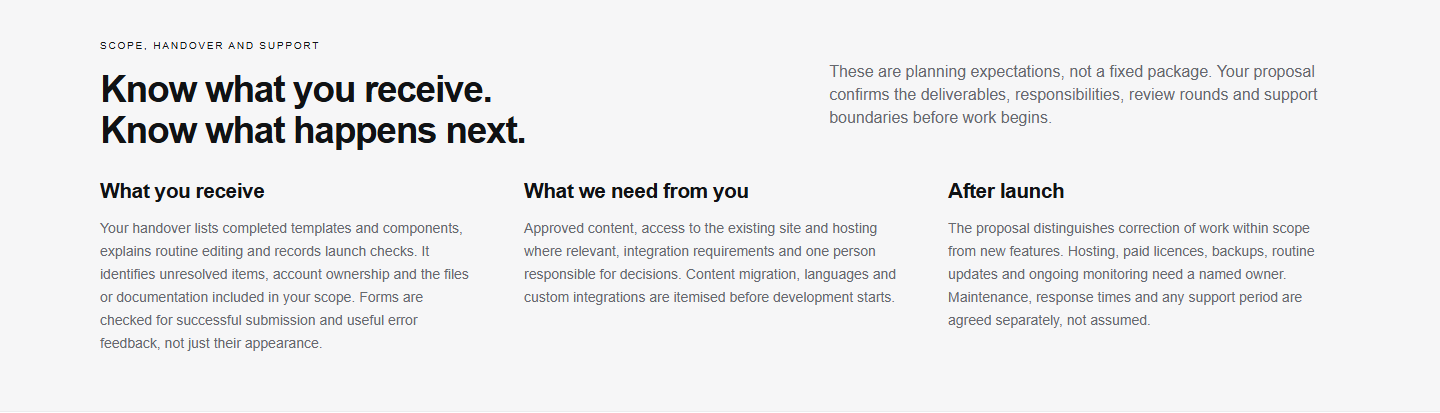
The published Web Development section explaining delivered files, customer responsibilities and support after launch
Published Web Development handover guidance, captured on 8 October 2026 in release 2.0.67.

Read the current Web Development service page. The screenshot records a particular release; the live page may change as the service is refined.

Limits of this evidence

These were controlled checks, not a field study or an independent accessibility certification. We have not established a conversion increase, revenue uplift or ranking improvement from these changes. A successful crawl does not guarantee indexing, and a successful test on one network does not establish uninterrupted availability everywhere.

No client results, testimonials or previous client websites are represented by the fictional design concept collection. Those studies demonstrate proposed design approaches.

How to interpret a similar project

Agree the pages, devices and user journeys to test before work begins. Keep a dated baseline and a record of what changed, then separate delivered work, verified behaviour and results that still need longer observation. Discuss your website if you need help defining that scope.

From brief to handover

See what changes
at each delivery stage.

This simplified example follows a service website from planning to handover. The sample materials below are illustrative, not files from a client project. Deliverables depend on the agreed scope.

  1. 01 · Brief
    Example brief

    Explain the service.
    Support useful enquiries.
    Assign a content approver.

    Agree what to build

    A brief records the audience, priority pages, content needs and constraints. Approve the scope and success checks before design starts.

  2. 02 · Wireframe

    Review the structure

    A wireframe shows the order of content and the route to an enquiry. Check the hierarchy before spending time on visual detail.

  3. 03 · Design
    Your service, clearly explained.

    Useful detail before a decision.

    Discuss a project →

    Define appearance and behaviour

    Approved designs describe mobile layouts, typography and control states. A design file is not yet a functioning website.

  4. 04 · WordPress
    Example editing viewPage headingYour service, clearly explained.Introductory copyExplain the offer in plain language.

    Build and test on staging

    Turn the agreed designs into templates and editing controls. Review the staging site, forms and navigation before approving launch. This diagram is not a screenshot of a live editor.

  5. 05 · Handover
    Example handover record

    Delivered templates
    Editing instructions
    Account ownership
    Checks and open items
    Support responsibilities

    Assign responsibility after launch

    Receive the agreed files and guidance. Record outstanding work and who owns updates, licences and backups. Confirm the support period separately.

See the record of our own website improvements →

Same thinking. Bigger opportunities.

Plan your brand, website or next digital improvement.

Strategy. Creativity. Technology. Growth. One coherent system.

Let’s talk